Showing posts with label email. Show all posts

Wednesday, July 9, 2014

James Explains: Stay True to Your Subject Line


It’s very simple actually, stick to your subject line.  The purpose of your email should be identified in your subject.  Keep it short and sweet and do not overthink it.  Tell your audience what they are about to open and the rest is gravy.

Your subject should be clear, concise, and true. If your message is a transactional one, meant to confirm that your customer’s order has shipped, make sure your subject line says so. “You’re Order has Shipped!” Enough said.

The body of the message should also be composed in a way that your reader is going to see the promised information first and foremost. Promotional content should be included but should not be taking up prime real estate.

Related products or services are most effective below the fold. Don’t think your customer won’t notice a bait and switch move. They will. The idea is to capitalize on the opportunity to provide valuable marketing information to your customers, should they decide they are ready to see it.

So, stay true to your subject line and don’t veer from it.  Your open rates depend on it!

Special thanks to JangoSMTP Account Executive, Erica Melzer, for helping me with this post!

Cheers,

James The Jangolope
Department of Awesome
JangoSMTP


About James
James the Jangolope is our JangoSMTP mascot. Each month, look for our new “James Explains” emails and blog posts on transactional email advice, trends, and quick tips. James will offer insight on how to improve your SMTP plan and how to use your JangoSMTP account to the fullest  
We want to hear from you. Have a topic you would like James to cover? Email us at marketing@us.jangomail.com with the subject line: James Explains. Follow James on Facebook

Tuesday, January 14, 2014

Are You a Safe Sender?

By: Melonie Mottice
Marketing Specialist


It's important to make sure you are following the best practices for deliverability. Encourage your customers to create a Safe Sender, or White List.

To start, I would recommend sending an email with step-by-step instructions on how to create a Safe Sender List, and remove emails from spam.   Step-by-step guides with screenshots work best.  If you're concerned that your customers never check their Spam Folder, post a guide on your website and social media networks.  They work well near your opt-in form and confirmation page.

In JangoSMTP, you can determine which email client your subscribers use most and shape your instructions around those providers.

In our case, Outlook ranks high and Gmail is king.  Here are the steps we suggest:

Microsoft Outlook 2010 / 2013

To remove from the Junk Folder:
1.  Check your Junk Folder
2.  Click on the email message to highlight it
3.  Go to the Home tab
4.  Select the arrow on the Junk drop-down menu
5.  Choose Never Block Sender's Domain


To create a Safe Sender List:
1.  Under the Home tab go to the Junk drop-down menu and click on Junk Email Options
2.  In the new window click the Safe Senders tab
3.  Click the Add button and enter in the desired email address
4.  Click OK

Gmail

To remove from the Spam Folder:
1.  Go to the Spam Folder
2.  Locate message from us
3.  Select the message
4.  Click the "Not Spam" button

To create a Safe Sender List:
1.  Enter JangoMail in the search bar
2.  Click arrow in the right of the search bar to filter
3.  Click Create filter link at the bottom right
4.  Select Never send it to Spam
5.  Click the “Also apply…” box to apply to similar messages
6.  Choose the blue Create button

Wednesday, May 22, 2013

Don't you have better things to do than babysit your SMTP Server?

Check out our latest video:


What will your IT team do with their free team after signing up with JangoSMTP?

Let us know what you think and sign up for a free account here!

Wednesday, April 3, 2013

Quick Account Usage Info at Your Fingertips

We added a quick go-to menu, accessible at the top of every JangoSMTP page that shares some of your account's vital statistics at a glance.

(displayed on mouse-over "13 days until,..")

When you are logged into your paid account, you will now see a link at the top of every page identifying how many days are left in your usage cycle. Mousing over the link produces a dialogue with stats including:

  • # of Messages used
  • # of Messages remaining
  • Volume of Data used
  • Volume of Data remaining
  • Messages and Data Available in the next cycle

Wednesday, September 5, 2012

JangoSMTP: Because Good Barbecue is Too Important to Leave to Chance

In the exciting world of email, there's a little niche that few think about. Remote monitoring emails are something many never think about. For many of JangoSMTP's customers, these emails are vital to their businesses. JangoSMTP is used to send thousands of monitoring emails for security systems, networking devices, and much more.

Many radio stations have broadcast towers in remote locations, while their offices are closer to town. FCC regulations require regular monitoring and logging of output power levels. In the old days of a decade ago an employee, or an expensive radio link would be used to monitor and log at the remote location. Modern equipment, though, allows the radio station to use JangoSMTP's inexpensive relays to replace expensive equipment and salary costs.

Many security cameras offer email monitoring. Using JangoSMTP, your security system can send you a photo anytime it detects movement. You can then view the email, and see the photo from your PC or even your phone, anywhere in the world.

But wait, you don't run a radio station.  You don't have a security system. You do, though, have a beautiful smoker that you use to make delicious barbecue. Personally, I'm imagining that it's Eastern North Carolina pork barbecue, but you may be a brisket fan. You can use JangoSMTP and the CyberQ II to monitor not one, but two barbecue pits at once. It can email you updates while it continues the low, slow, smoky heat that good barbecue requires.

If you're looking for an SMTP server for your remote monitoring tool, try a Free JangoSMTP Trial Account. You can send up to 200 emails per month with the trial. Need more?  Let us know.

We're JangoSMTP.  We don't make your barbecue, but we do help them make it taste better.

Wednesday, July 25, 2012

Our Latest Video! The Email Hookup

Don't let your email be a wallflower, rejected and alone. Hook him up with JangoSMTP.


How did you like our latest video?

Thursday, June 14, 2012

IP Authentication - We've Reached 10,000

At JangoSMTP, we stand apart from the crowd in many ways, and one of the most prominent is our ability to authenticate customers directly by IP address. In fact, we now have more than 10,000 IPs authenticating into our transactional mail relays worldwide

IP authentication allows customers to pass mail through the JangoSMTP mail relay from anywhere in their organization, without providing traditional account credentials (such as a username and password). Customers who choose to use IP authentication can add their outgoing email IP addresses to the IP authentication list. Then when we receive their email, we can recognize their IP address as a trusted client and forward the email right along. Sending is a breeze.

Add your IP addresses to the "Authenticated IP Addresses" list on the Settings page

JangoSMTP has proven to be a powerful tool for thousands or organizations sending email. They depend on the service for its' outstanding deliverability, reliability, tracking, advanced reporting, sending triggers, and more.  Setup is simple and even more so with the flexibility of IP authentication. Simply specify JangoSMTP as your outgoing email server in your email client or email server, add your IP to our "Authenticated IP Addresses" list under settings. And let us handle the rest. It's that easy! Note: Your IP should be dedicated (not dynamic or shared).

The IP authentication feature is one of JangoSMTP's superstars. Customers from more than 117 countries worldwide authenticate into the mail relays via IP and entrust us with their email delivery. If you haven't given this option of authentication a try we encourage it. Many find that it provides a high level of flexibility to their transactional sending needs.

How are you emailing? Drop us a line. Or an email. We'd love to hear from you! Thanks for using JangoSMTP.

Friday, May 4, 2012

Our Latest Email Commercial: Undelivered. Undead.

What happens to emails that aren't sent with JangoSMTP?

They roam for an eternity in the nether regions of the email underworld. Not quite dead, but lost in the maze of network obstacles and spam filters.

Be your Email's hero and keep him away from the pile of the email undead.


Ready to save your emails from Zombiehood? Sign up for a free JangoSMTP account at http://www.jangosmtp.com/Free-Account.asp.

Monday, February 6, 2012

How to Send Joomla Emails Through JangoSMTP

If you're using Joomla to manage your website, then you don't need any additional plugins to start sending through JangoSMTP. Just go to Global Configuration, then Server, then change the Mail Settings in the lower right-hand corner of that screen.

Mailer: SMTP
From Email: Your Stored From Address
From Name: Your Name
SMTP Authentication: Yes
SMTP Port: 25 SMTP
Username: Your JangoSMTP Username
SMTP Password: Your JangoSMTP Password
SMTP Host: relay.jangosmtp.net

Your settings should look something like this:

Monday, January 23, 2012

Feature Enhancement: Secure and More Professional Click Tracking

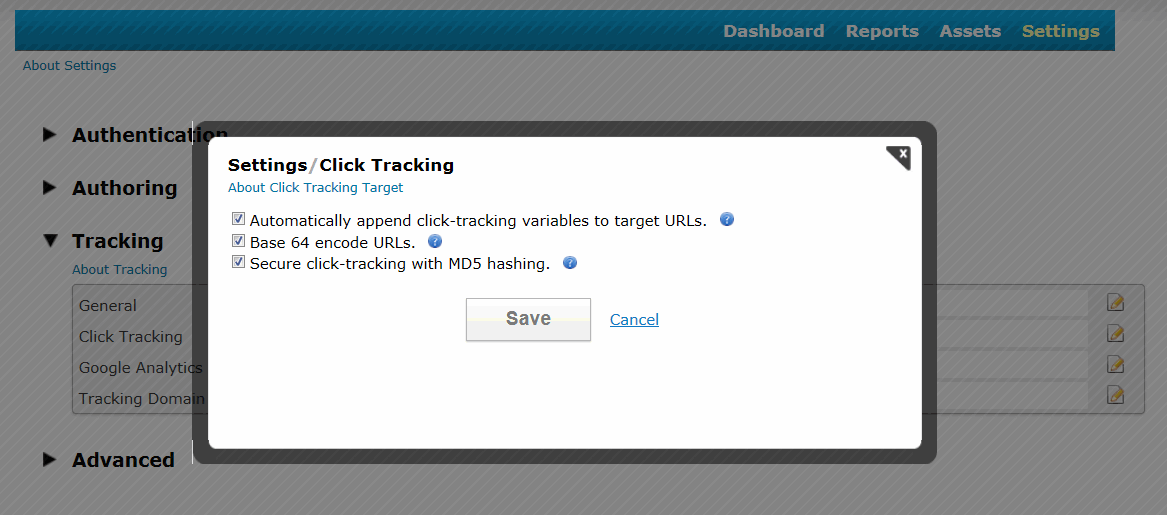
JangoSMTP has two new click tracking options for transactional emails. The new settings, base-64 encoding and MD-5 hashing, make the links operate more securely and look more professional.

When click tracking is turned on for a transactional email, the URLs are converted into trackable URLs that typically look like this:

http://x.browniekitchen.com/y.z?l=http%3A%2F%2Fwww.browniekitchen.com&e=1&j=269829603
This URL is less secure because it shows the destination URL, which could be changed by a malicious phisher.  JangoSMTP has added these two new settings to increase the URL's security. Base-64 encoding encodes the URL so that it doesn't reveal the destination URL. The MD-5 hash feature causes the redirect to the URL to fail if the hash does not match the URL.

Here is an example of a click-tracked URL that is both base-64 encoded and includes the MD-5 hash.  Notice the addition of the h= parameter and that the l= parameter is now a base-64 string:

http://x.browniekitchen.com/z.z?l=aHR0cDovL3d3dy5icm93bmlla2l0Y2hlbi5jb20%3D&e=1&j=269829534&h=6f5c4e957783bf712c74f80f1fb083fa

A URL with click tracking that is NOT base-64 encoded but includes the MD-5 hash looks like this:

http://x.browniekitchen.com/z.z?l=http%3A%2F%2Fwww.browniekitchen.com&e=1&j=269829571&h=6f5c4e957783bf712c74f80f1fb083fa

URLs with base-64 encoding look more professional and recipients are more confident when clicking them.  URLs without this encoding clearly show one URL that has another URL as a parameter, which can make a recipient more hesitant to click. The MD-5 hash prevents tampering with the destination URL.  If someone were to change the l= parameter in a URL that contains the hash, then the user would NOT be redirected to the destination URL.

To set click-track settings, go to Settings --> Tracking --> Click Tracking


Please note that in the URL examples above, we used a branded tracking-domain, x.browniekitchen.com.  We recommend that all users setup a branded tracking-domain based on their organization's domain.  To read why, see this blog post: The importance of setting up a custom tracking domain.

All new JangoSMTP accounts will have both of these settings on by default.  If you are a current client, we recommend that you turn on both of these settings now.  Please note that JangoSMTP will enable these two settings for all existing accounts automatically over the next few weeks.

Thursday, December 22, 2011

Our new commercial! Your email's superhero.

Who wouldn't want their own personal superhero? Now your email has one!

With JangoSMTP, your transactional email has backup: a host of deliverability optimization tools and support that, quite literally, kicks ass. If email gets off track, it's JangoSMTP to the rescue.


JangoSMTP: Your email's superhero.