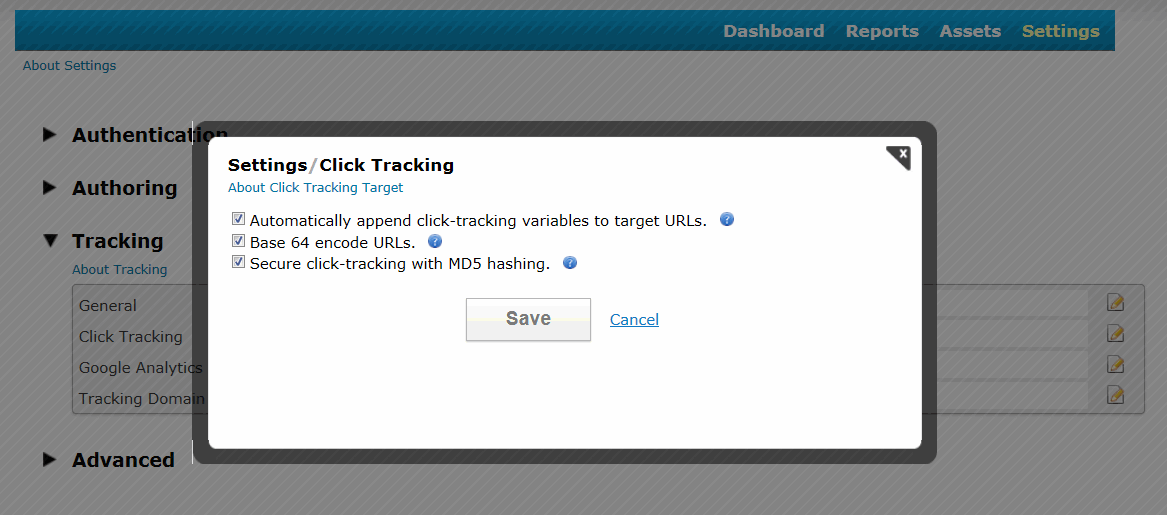
JangoSMTP has two new click tracking options for transactional emails. The new settings,
base-64 encoding and
MD-5 hashing, make the links operate more securely and look more professional.
When click tracking is turned on for a transactional email, the URLs are converted into trackable URLs that typically look like this:
http://x.browniekitchen.com/y.z?l=http%3A%2F%2Fwww.browniekitchen.com&e=1&j=269829603
This URL is less secure because it shows the destination URL, which could be changed by a malicious phisher. JangoSMTP has added these two new settings to increase the URL's security.
Base-64 encoding encodes the URL so that it doesn't reveal the destination URL. The
MD-5 hash feature causes the redirect to the URL to fail if the hash does not match the URL.
Here is an example of a click-tracked URL that is both base-64 encoded and includes the MD-5 hash. Notice the addition of the h= parameter and that the l= parameter is now a base-64 string:
http://x.browniekitchen.com/z.z?l=aHR0cDovL3d3dy5icm93bmlla2l0Y2hlbi5jb20%3D&e=1&j=269829534&h=6f5c4e957783bf712c74f80f1fb083fa
A URL with click tracking that is NOT base-64 encoded but includes the MD-5 hash looks like this:
http://x.browniekitchen.com/z.z?l=http%3A%2F%2Fwww.browniekitchen.com&e=1&j=269829571&h=6f5c4e957783bf712c74f80f1fb083fa
URLs with base-64 encoding look more professional and recipients are more confident when clicking them. URLs without this encoding clearly show one URL that has another URL as a parameter, which can make a recipient more hesitant to click. The MD-5 hash prevents tampering with the destination URL. If someone were to change the l= parameter in a URL that contains the hash, then the user would NOT be redirected to the destination URL.
To set click-track settings, go to
Settings --> Tracking --> Click Tracking
Please note that in the URL examples above, we used a branded tracking-domain, x.browniekitchen.com. We recommend that all users setup a branded tracking-domain based on their organization's domain. To read why, see this blog post:
The importance of setting up a custom tracking domain.
All new JangoSMTP accounts will have both of these settings on by default. If you are a current client, we recommend that you turn on both of these settings now.
Please note that JangoSMTP will enable these two settings for all existing accounts automatically over the next few weeks.