Tuesday, November 6, 2012

It's Been A While

How are things?

We wanted to update you on some of the new features we've been working on in recent weeks.

Most of the new features and updates we've made lately have been for our Broadcast Marketing Product, JangoMail. If you're interested in a product with all of the features of JangoSMTP as well as additional features tailored specifically for list management and broadcast email marketing, check out our JangoMail blog to learn about some of the latest features we've developed. Consider a Free Trial or a subscription and give it a test run.

Inline with our commitment to bringing you the best transactional email experience, we have some cool new features to help you make the most of JangoSMTP.

Multiple CC's and BCC's

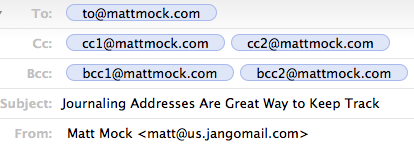
We made some modifications to how bcc and cc's work. Plain and simple, we added the capability to specify multiple cc's and bcc's in your email via the SendTransactionalEmail API Method or by sending them through the relay-- and we made sure that they're displayed exactly how you want them displayed for every end-recipient.

To specify multiple cc and bcc addresses with the SendTransactionalEmail API method:
See the method's help page for a full reference. Specify cc's and bcc's via the "option" string parameter. Use a comma between each option (cc and bcc) and a semicolon between each email address, as in this example:

cc=cc1@mattmock.com;cc2@mattmock,bcc=bcc1@mattmock.com;bcc2@mattmock.com

To specify multiple cc and bcc addresses via the transactional relay:
Compose your email exactly how you would normally with your email client, via your website, or your application, specifying the cc/bcc addresses as you normally would. Bounce your email off the relay server at relay.jangosmtp.net at the standard SMTP port and use either SMTP Auth with your JangoSMTP username and password, IP authentication by specifying your private, external IP address in your JangoSMTP account settings, or use an authorized "From Address" that you specified in your account settings. And leave the rest up to us.

Journaling Addresses

One feature many customers asked us for was "Journaling Addresses". These are email addresses you can add to your account that receive a receipt (copy) of every outgoing email that is sent through the relay or with the API. With journaling addresses, keeping a re-traceable history of all outgoing communications for internal audit purposes couldn't be more simple.

To add Journaling Addresses to your account:
Go to Settings --> Authoring --> Journaling Addresses
And add as many journaling addresses as you'd like.

Journaling Addresses receive a copy of every email that is transmitted through the relay with all headers intact in the way they were originally crafted by you before initiating the send. For example, if you sent an email to a recipient with 4 cc's and 4 bcc's, you will see all of these recipients under the proper heading (to/cc/bcc) in the email sent to the journaling address, so you can have a real, traceable audit of all emails that were sent.


Sync Unsubscribes to Salesforce

We gave you the ability to connect to your Salesforce account and sync your unsubscribed list to Salesforce, so you can be sure you have most relevant data on your users that have unsubscribed from your transactional emails.

This is a feature that has been available for JangoMail customers for a few months now and it was specifically requested by a JangoSMTP customer-- so we thought, why not? To connect to your Salesforce account and sync your unsubscribed list:

Go to Settings --> Advanced --> Link Salesforce.com Accounts

And add your Salesforce Credentials on the dialog that comes up. There's a little bit of setup you need to do on Salesforce first but after that you should be good to go. If you use Salesforce, this new feature can save you a bunch of manual labor in the short term and in the long run, as syncing occurs on a daily basis.


Connect and Sign-In with Facebook

Do you use Facebook? Who doesn't? JangoMail has many new features that involve Facebook, but we thought we'd open the gates of possibility and give you the option to connect with Facebook on JangoSMTP as well. First and foremost, you'll be able to sign into your JangoSMTP account with a single click of the "Sign-In with Facebook" button on the login page. No need to remember your JangoSMTP credentials, unless that's your thing.

To connect with Facebook:
Go to Settings --> Advanced --> Connect with Facebook


And click the button to connect with Facebook. Once connected, you'll be able to Login to JangoSMTP with Facebook from the login page. New users can also sign-up for a Free JangoSMTP account with Facebook as well. Future integrations we make with Facebook will be right at your fingertips. What other features would you like to see us develop with Facebook?


Until Next Time

It has been great catching up with you. But we have to get back to doing what we do best-- delivering emails. We look forward to the next run-in where we'll have more exciting news for you. Stay tuned, happy sending, and drop us an email anytime. We'd love to hear from you.

Tuesday, October 16, 2012

Trouble sending email through your ISP? JangoSMTP to the rescue!

A customer of ours recently purchased a new laptop and wanted to set up her email using Windows Live Mail 2011.  She already had a Shaw webmail account and wanted to set it up inside of Windows Live Mail.  Using the instructions provided by her webmail account, she was unable to get it working - “I could receive but not send email...kept getting error codes...and I’m not bad at this stuff!”

After two days of trying to get this working, she found JangoSMTP while doing a search, and decided to try our services.  After setting up a free account with us, she said “(I) reconfigured my outgoing server settings, and have had no problems”.  While port 25 didn’t work for her (this port is blocked by many internet providers), she used another port that we provide, port 587 and was able to immediately start sending emails.

“This is awesome, you guys are the magic answer!”

Using your ISP’s email server to send email can sometimes be problematic, due to restrictions put in place to help prevent spammers from relaying email through their email servers.  These restrictions can sometimes place legitimate users in a difficult position of not being able to get their outgoing email working.  This is where JangoSMTP can help!  Using JangoSMTP, you can set up your email client to relay messages through our servers, but replies will still come back to your own address.

If you’re in a similar situation and are looking for an answer to your sending problems, try a Free JangoSMTP account.  Have questions?  Let us know - we’re standing by to help!

Wednesday, September 5, 2012

JangoSMTP: Because Good Barbecue is Too Important to Leave to Chance

In the exciting world of email, there's a little niche that few think about. Remote monitoring emails are something many never think about. For many of JangoSMTP's customers, these emails are vital to their businesses. JangoSMTP is used to send thousands of monitoring emails for security systems, networking devices, and much more.

Many radio stations have broadcast towers in remote locations, while their offices are closer to town. FCC regulations require regular monitoring and logging of output power levels. In the old days of a decade ago an employee, or an expensive radio link would be used to monitor and log at the remote location. Modern equipment, though, allows the radio station to use JangoSMTP's inexpensive relays to replace expensive equipment and salary costs.

Many security cameras offer email monitoring. Using JangoSMTP, your security system can send you a photo anytime it detects movement. You can then view the email, and see the photo from your PC or even your phone, anywhere in the world.

But wait, you don't run a radio station.  You don't have a security system. You do, though, have a beautiful smoker that you use to make delicious barbecue. Personally, I'm imagining that it's Eastern North Carolina pork barbecue, but you may be a brisket fan. You can use JangoSMTP and the CyberQ II to monitor not one, but two barbecue pits at once. It can email you updates while it continues the low, slow, smoky heat that good barbecue requires.

If you're looking for an SMTP server for your remote monitoring tool, try a Free JangoSMTP Trial Account. You can send up to 200 emails per month with the trial. Need more?  Let us know.

We're JangoSMTP.  We don't make your barbecue, but we do help them make it taste better.

Wednesday, July 25, 2012

Our Latest Video! The Email Hookup

Don't let your email be a wallflower, rejected and alone. Hook him up with JangoSMTP.


How did you like our latest video?

Thursday, June 14, 2012

IP Authentication - We've Reached 10,000

At JangoSMTP, we stand apart from the crowd in many ways, and one of the most prominent is our ability to authenticate customers directly by IP address. In fact, we now have more than 10,000 IPs authenticating into our transactional mail relays worldwide! 

IP authentication allows customers to pass mail through the JangoSMTP mail relay from anywhere in their organization, without providing traditional account credentials (such as a username and password). Customers who choose to use IP authentication can add their outgoing email IP addresses to the IP authentication list. Then when we receive their email, we can recognize their IP address as a trusted client and forward the email right along. Sending is a breeze.

Add your IP addresses to the "Authenticated IP Addresses" list on the Settings page

JangoSMTP has proven to be a powerful tool for thousands or organizations sending email. They depend on the service for its' outstanding deliverability, reliability, tracking, advanced reporting, sending triggers, and more.  Setup is simple and even more so with the flexibility of IP authentication. Simply specify JangoSMTP as your outgoing email server in your email client or email server, add your IP to our "Authenticated IP Addresses" list under settings. And let us handle the rest. It's that easy! Note: Your IP should be dedicated (not dynamic or shared).

The IP authentication feature is one of JangoSMTP's superstars. Customers from more than 117 countries worldwide authenticate into the mail relays via IP and entrust us with their email delivery. If you haven't given this option of authentication a try we encourage it. Many find that it provides a high level of flexibility to their transactional sending needs.

How are you emailing? Drop us a line. Or an email. We'd love to hear from you! Thanks for using JangoSMTP.

Monday, May 21, 2012

It's Good To Have A Backup


While all services strive for maximum uptime and reliability, necessary maintenance and unforeseeable events mean even the best service experience outages. What do companies do to keep their customers “in the loop” when the extraordinary happens?

Q: A tech company relies on its servers. What do companies do to alert customers when their servers are down?
A: Companies are usually at a loss because when their servers are down, so are their customer databases and notification systems...

Q: So, intelligent companies come up with a backup plan, right?
A: Yes, intelligent companies do--

Here at JangoSMTP, we're proud to announce the launch of a new customer alert system built entirely separate from our internal mail servers and customer database. This system will send emergency notifications to clients in the event that we have an outage of any kind.

With this new notification system in place, customers can rest assured that nothing will prevent us from notifying them of important news or information that affects their service. This feature was brought on by customer request, and we're very happy to receive such input from clients who have a great need for reliability.

But what do you say we revisit that last question again?

Q: So, intelligent companies come up with a backup plan? (when their servers go down)
A: Yes, and really intelligent companies, they make sure those outages don't happen in the first place.

Already at JangoSMTP, we're proud to boast server reliability greater than 99.5% -- this is top notch for the industry and hardly met by competitors. But soon we'll be rolling out with even greater reliability--where a service interruption of any kind could quite literally be unheard of. A development process is already underway to unfold a large scaling customer database redundancy network throughout the US.

Let me explain. JangoSMTP is already equipped with quite a bit of redundancy. Our distributed network of email senders are in place throughout the US ensuring that your mail is sent, if not by its primary server, then by one of over 60 backup servers in place. This is why our delivery rate is simply unparalleled by our competitors.

Soon we'll bring this same kind of reliability to our customer database as well, so a disruption of any kind at JangoSMTP would just be pretty remote to say the least.

We have many customers worldwide that rely on us to be their email delivery partner, so our architecture development team will continue to grow redundancies throughout every portion of our system. Stay tuned for updates and many more exciting features coming soon! As always, please continue to send us feedback about how we can better serve you. We want to build the product bigger and better and make it fill the needs that arise in the industry. Thank you for using JangoSMTP.

Matthew Mock has joined our team as Product Manager. Matt specializes in building the bridges between customer experience and the developer team, to plan, coordinate, and bring to fruition the great feature ideas and improvements that come from our customers and architecture team members alike. Matt has a degree in Computer Science from Colorado School of Mines and has developed numerous viral web apps including the Youtube music player, MoonPlayer. We welcome Matt onto the team! --Kim Wright, Director of Operations)

Friday, May 4, 2012

Our Latest Email Commercial: Undelivered. Undead.

What happens to emails that aren't sent with JangoSMTP?

They roam for an eternity in the nether regions of the email underworld. Not quite dead, but lost in the maze of network obstacles and spam filters.

Be your Email's hero and keep him away from the pile of the email undead.


Ready to save your emails from Zombiehood? Sign up for a free JangoSMTP account at http://www.jangosmtp.com/Free-Account.asp.