Showing posts with label email api. Show all posts

Monday, March 12, 2012

How to Use JangoSMTP from a Python Script

Like many other programming languages, Python provides a built-in library for sending SMTP emails. After you import smtplib, all you have to do is instantiate a MIMEMultipart object to hold email information, then send the message via smtplib.SMTP.

This example demonstrates how to set up and send an email from a Python script using JangoSMTP. Download the source code for this example, insert your own JangoSMTP username/password/etc and start sending tracked emails today!

# create the message object
msg = MIMEMultipart('alternative')
msg['Subject'] = "JangoSMTP from Python Test"
msg['From'] = FromAddress
msg['To'] = ToAddress
 
# Create a plain-text and an HTML version of the message
text = "This is a plain text email sent from a python program!"
html = """\
<html>
  <head></head>
  <body>
    <p>
      This is an html email sent from a <b>python</b> program!
    </p>
  </body>
</html>
"""
 
# JangoSMTP credentials
username = "Your JangoSMTP Username"
password = "Your JangoSMTP Password"

# store both parts of the email
part1 = MIMEText(text, 'plain')
part2 = MIMEText(html, 'html')
 
# Attach parts into message container.
msg.attach(part1)
msg.attach(part2)
 
# Open a connection to the JangoSMTP server
s = smtplib.SMTP('relay.jangosmtp.net', 25)
 
# Authenticate
s.login(username, password)
 
# send the email
s.sendmail(FromAddress, ToAddress, msg.as_string())

Monday, January 16, 2012

How To Use JangoSMTP With Wordpress

Wordpress is one of the most popular blogging platforms on the web. If you're serious about blogging, it's important that your Wordpress-generated emails are tracked and delivered, and JangoSMTP can help with that. Setting up Wordpress to send via JangoSMTP is a snap!

Start by downloading and installing the WP Mail SMTP plugin. To install it, just unzip it and upload it to your plugins folder, which can be found within the wp-content folder.

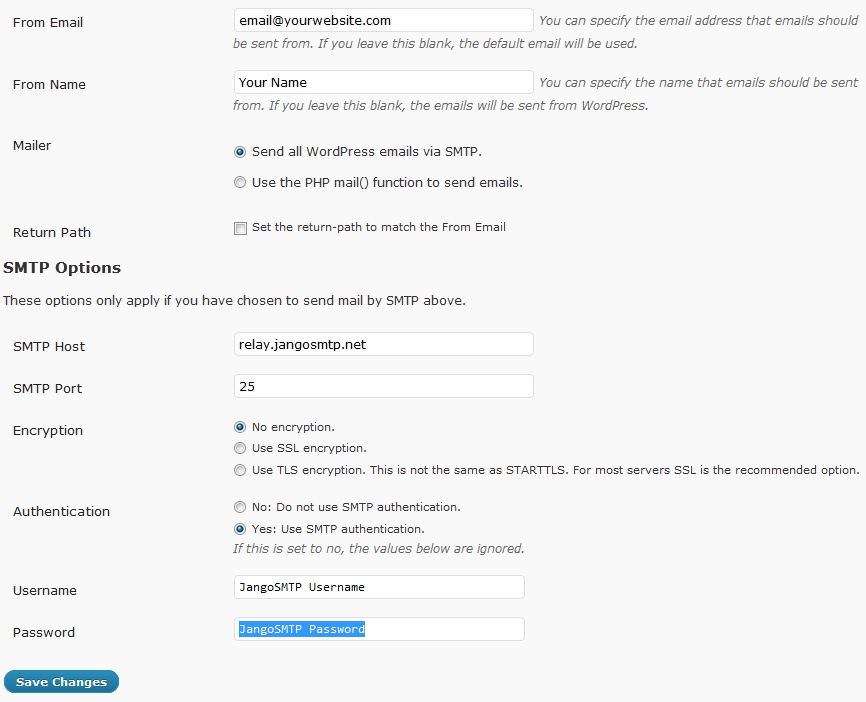
Then log in to your Wordpress blog, go to the plugins page and enable the WP-Mail-SMTP plugin. Go to the settings page for this plugin and enter this information:

Mailer: Send all Wordpress emails via SMTP.
SMTP Host: relay.jangosmtp.net
SMTP Port: 25 (or whatever you normally use)
Encryption: No encryption (or whatever you normally use)
Authentication: Yes: Use SMTP authentication.
Username: Your JangoSMTP Username
Password: Your JangoSMTP Password

Your settings page should look something like this:


Then all of your Wordpress emails will be sent through JangoSMTP. You can enable tracking and other features through the JangoSMTP settings.

Tuesday, July 19, 2011

The geek gets the girl in the latest JangoSMTP YouTube commercial!

Are you serving your customers well?

The online world can't tell if your customers are a "Big Deal" or not, so make sure they all get first class treatment with JangoSMTP.

Check out our latest video here.


JangoSMTP: Email. Track. Confirm!

Monday, October 26, 2009

New API Method: AddTransactionalGroup

We just released a new API method for the JangoMail API which allows you to add a Transactional Group to your account:

*AddTransactionalGroup
  Adds a new Transactional Group to your account. Returns a string.

We also recently released 3 other transactional email API methods. These methods allow you to retrieve opens, clicks, unsubscribes, bounces, and complaint statistics for a single transactional email in your account.

Visit api.jangomail.com for a full list of our API methods.