Tuesday, April 26, 2011

New Setting: Preserving the original Message-ID header in transactional email

We've added a new checkbox on the Settings --> SMTP Relay page, that allows you to preserve the Message-ID of an email sent via the SMTP relay, rather than have it be overwritten by the JangoSMTP system Message-ID, which is the default behavior.


The JangoSMTP system Message-ID looks like:

Message-ID: <254970262215471@jngomktg.net>

It's a unique number followed by @jngomktg.net. Some JangoSMTP users have asked that the original Message-ID of the message transmitted through the relay be used instead of being overwritten by the JangoSMTP system Message-ID. For example, if you send an email using Mozilla Thunderbird, the Thunderbird-generated Message-ID looks like:

Message-ID: <4DB66014.1070804@silicomm.com>

In Thunderbird's case, the Message-ID contains a unique string of alphanumeric characters and uses the domain of the receiving email address. If the Preserve Message-ID box is checked, this will also be the Message-ID in the final email delivered to the recipient. If unchecked, this Message-ID will be replaced by the JangoSMTP system generated Message-ID.

Calling the API directly

If calling the transactional email API directly via the SendTransactionalEmail method, you can specify a custom Message-ID in the Options parameter using the CustomHeaders attribute:

Options:

OpenTrack=True,ClickTrack=False,NoClickTrackText=True,SkipUnsubCheck=False,SkipBounceCheck=False,UseSystemMailFrom=True,CustomHeaders=Message-ID:<4DB65FC8.8050705@silicomm.com>

Why is this useful?

Allowing you full control of the Message-ID header value is useful if you have a custom reply management system in place, such that responses and bounces can be tagged with their original Message-ID.

Fix: Transactional email delivery to the Sprint SMS email gateway

A JangoSMTP user recently reported that transactional email sent by JangoSMTP to the SMS email gateway for Sprint (@messaging.sprintpcs.com domains) were not being delivered. Upon investigation by our deliverability team, we found the SMTP logs showed successful delivery, which indicated that some type of filtering was taking place after receipt by Sprint's email servers but before delivery to the customer's phone. Isolating the issue proved to be difficult, as Sprint's postmaster team was unwilling to assist our deliverability team in resolving the issue.

Through trial and error, the issue was isolated to the Message-ID header present in all transactional email sent from JangoSMTP. Typically, the Message-ID header looks like:

Message-ID: <254970262215471@jngomktg.net>

It's a unique number followed by the domain jngomktg.net, which is a domain not used for anything else except the Message-ID header in emails sent by JangoSMTP. The Message-ID must be a syntactically valid email address, but not a real-world valid email address, as specified by RFC 2822, section 3.6.4.

In our trial and error testing, we found that the presence of the domain jngomktg.net resulted in non-delivery of the text messages to Sprint phones. Changing the domain in the Message-ID to jsmtp.net, another one of the many domains used throughout the JangoSMTP service, resolved the issue.

Message-ID: <254970262215471@jsmtp.net>

Therefore, all transactional emails delivered from JangoSMTP to @messaging.sprintpcs.com recipients will have a Message-ID containing jsmtp.net, while all other emails will continue to use the traditional Message-ID domain of jngomktg.net. Furthermore, we will soon be launching a feature that allows you, the user, to completely customize the Message-ID header with your own internally generated identifier.

We don't yet have an explanation as for why jsmtp.net results in delivery while the presence of jngomktg.net results in non-delivery, but we hope this information proves useful to JangoSMTP customers and the transactional email community at large, in resolving delivery issues to the SMS email gateway for Sprint.

Wednesday, February 16, 2011

New Feature: Restrict who can use the SMTP Relay

We've launched a new feature that allows you to restrict who can use the SMTP service by From Address. Under Settings --> Advanced --> From Addresses, you may designate which email addresses and domains can send through the relay.


By default, all email addresses and domains can send through the relay.

You only need to specify From Addresses if you wish to restrict the relay to use just by certain people. If you wish to restrict the use of the relay to an entire domain, you can use the wildcard notation *@domain.com as the From Address to represent all addresses for domain.com.


Note: Specifying From Address restrictions only apply to emails sent through the SMTP relay, and not through the transactional email API.

Monday, February 7, 2011

The JangoSMTP commercial you didn't see during the Super Bowl

Amongst the bevy of entertaining commercials that aired during the big game, here's one you didn't get to see -- the new JangoSMTP commercial. Did the NFL ban it for racy content?  No, it's just that we thought $3.5M could be better spent elsewhere, like adding features and making infrastructure improvements. Enjoy!

Tuesday, February 1, 2011

How Does JangoSMTP Compare to Amazon SES?

By now many of you have probably heard about Amazon's new Simple Email Service (SES). If you haven't heard, Amazon recently launced SES, a low-cost, very basic API-driven transactional email service. There are many people interested in learning more about how this compares to JangoSMTP, so we wanted to help you understand how both email services work.

How does JangoSMTP compare to Amazon SES and which is the right service for me?

If you are looking for a minimalist email service for the lowest price, then the Amazon SES may make sense for you.

JangoSMTP is more robust, in that it has both API and SMTP relay options, along with bounce and unsubscribe management, open and click tracking and advanced reporting (Google Analytics, logging, etc.).

Do you need more than a simple sending service? This is not a one size fits all industry, so consider the following in making your choice so that you get the right fit for your needs:

- Delivery assistance. How do you confirm your messages are getting through, and how do you get help if they are not?

- Development skills. Do you have the development resources available to build to an API? Do you need to build an automated solution to handle complaints and bounces as you receive them? (Amazon sends these back to the From Address used in the campaign, and you have to handle them locally.)

- Reporting. What do you want to see about how your mailings are doing? Do you only need a log of messages sent, or do you want to see if they’ve been opened, links clicked, etc.?

There is a lot of room in the high volume email industry, and you want to find the right fit so that your integration doesn’t leave you frustrated with your results.

Here's a quick comparison chart for reference:

Feature
JangoSMTPAmazon SES

Open Tracking
YesNo

Click Tracking
YesNo

Automatic DKIM Signing
YesNo

Google Analytics Integration
YesNo

Log reporting
YesNo

Real-Time Reporting
YesNo

Automated Complaint/Bounce Handling
YesNo

Customer/Delivery Support
YesNo

API
YesYes

SMTP Relay Server
YesNo

Price Per 1,000
$0.97- $7.00$0.10

Free Service
200 emails/month2,000 emails/day

Wednesday, January 26, 2011

New Feature: Preserve Custom headers when using the SMTP service

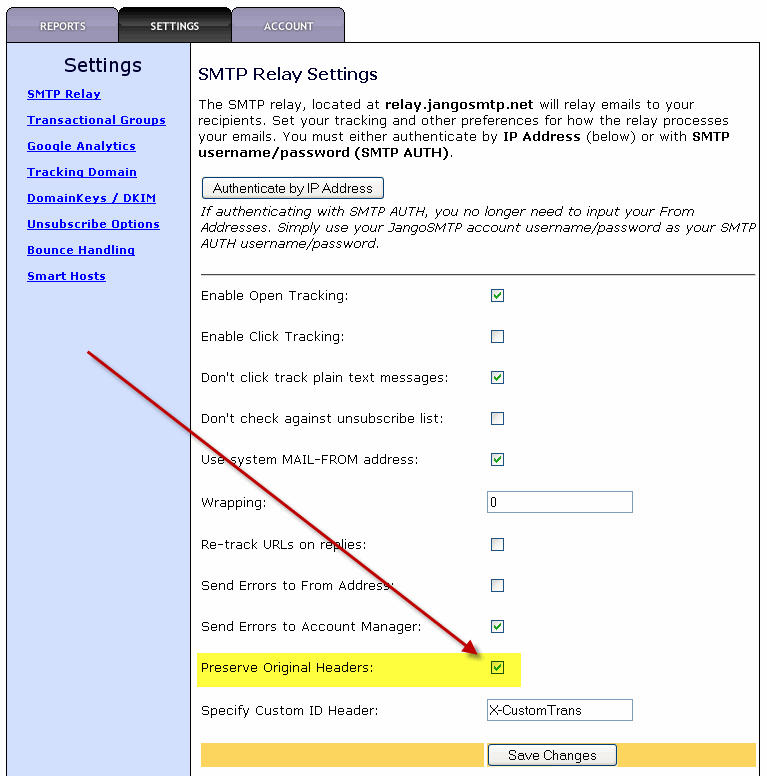
You now have the option to preserve custom headers when relaying transactional email through relay.jangosmtp.net. To enable this option, go to Settings --> SMTP Relay, and check the Preserve Headers checkbox.


Enabling this option will preserve any custom headers that are a part of your email message. Prior to this feature, custom headers would be stripped off by the SMTP Relay before the email was delivered to the recipient. Now, if your email message includes custom headers or headers added on by an email client like:

X-MSMail-Priority
User-Agent

they will be included in the final email sent to the recipient. Additionally, if you have custom headers that help identify an email message in your internal system, such as:

X-CustomEmailID

those will also be preserved.

In the future, we'll be enabling an option such that you can set a particular custom header's value to show in Reports, allowing you to tie each individual sent email, open, and click back to your internal system's own identification mechanism.

Tuesday, January 25, 2011

How to separate transactional email into separate JangoSMTP accounts when sending from a single IP address

Over the year and a half since we launched JangoSMTP, we've had a handful of clients come to us with a unique setup request that we were unable to accommodate -- until now. We had some agency type users that were setting JangoSMTP up on behalf of their clients. They wanted to authenticate into the SMTP service by IP address, because their system didn't allow them to use SMTP AUTH. However, since they were coordinating transactional email on behalf of multiple clients, they wanted the different emails to go into different JangoSMTP accounts, even though all email would be sent from the same single IP address.

This is now possible with a custom header that will force JangoSMTP to assign an email to a particular account:

X-SMTPUsername: TheAccountUsername

If you include this header in each email message, then the message will be assigned to the JangoSMTP account with the username designated in the header, regardless of the IP address from which it is sent. The sending IP address would still need to be added to one of the JangoSMTP accounts, but it wouldn't matter which account.

For example, let's say you're a web development agency, and you have five clients, and you host all five of your clients' web sites on a shared server with a single IP address. You might create five JangoSMTP accounts with the usernames:

  1. BrownieKitchen
  2. CookieMonsterCo
  3. PizzaFactory
  4. ScoopOfCream
  5. ChickenChaCha
You would add the IP of the shared web server to any one of the five accounts -- it doesn't matter which one. But, for each transactional email sent through the SMTP relay service, you would include the header:

X-SMTPUsername: PizzaFactory

to assign that email to the PizzaFactory account, for example.